
Advanced MCP Server
by Yugma Tech🤖 MCP Server for Odoo
Connect Claude | Cursor | VS Code | Any AI Assistant
Enable AI assistants to interact with your Odoo ERP using natural language. Search, create, update, and delete records with simple commands.
🐍 OFFICIAL PYPI PACKAGE BY YUGMA TECH: pip install yt-mcp-server-odoo✅ Why Choose Our MCP Server?
🌐 What is Model Context Protocol (MCP)?
Model Context Protocol (MCP) is an open standard developed by Anthropic that enables seamless integration between AI assistants and data sources. It provides a universal way for AI systems to securely access and interact with your business data.
Universal Standard
Works with Claude, Cursor, VS Code, and any MCP-compatible AI
Secure Access
API key authentication respects Odoo's permission system
Natural Language
Ask questions like "Show unpaid invoices" - AI handles the rest
🚀 Why MCP is Game-Changing
The future of AI-ERP integration is here
Universal Compatibility
One integration connects ALL MCP-compatible AI tools. Claude, Cursor, VS Code, Windsurf, Zed — no custom development needed for each.
Enterprise-Grade Security
Built with security-first architecture. API key authentication, rate limiting, audit logs, and full respect for Odoo's permission system.
Future-Ready Architecture
As new AI assistants emerge with MCP support, your Odoo integration works instantly. No updates, no migrations, just connect and go.
💼 Transform Your Business
Real impact from day one
Zero-Code AI Integration
Connect any AI assistant to your Odoo data instantly. No API development, no custom code required.
Empower Every Team Member
Let employees use their preferred AI tools to access Odoo data naturally. Sales, support, operations — everyone benefits.
No Vendor Lock-in
Switch between AI providers freely. Your MCP integration remains constant while you choose the best AI for your needs.
🎬 See It In Action
Watch how MCP Server connects AI assistants to your Odoo ERP!
✨ Ask → Get Data → Done!
Natural language access to your Odoo data.
Why Choose Our MCP Server?
More features. Better security. Official PyPI package by Yugma Tech.
❌ Other Solutions
- ✗ Basic CRUD only
- ✗ No bulk operations
- ✗ Limited rate limiting
- ✗ No smart field selection
- ✗ Manual client setup
- ✗ Basic logging
✅ YT MCP Server
- ✓ Full CRUD + Count + Browse
- ✓ Bulk Create & Update
- ✓ Configurable Rate Limiting
- ✓ Smart Field Selection
- ✓ Official PyPI Package by Yugma Tech
- ✓ Comprehensive Audit Logs
📊 Full CRUD Capabilities
Complete data management through natural language
Create
"Add 10 new contacts"
"Create invoice for Acme"
Read
"Show unpaid invoices"
"Find customers from Spain"
Update
"Change order status"
"Update phone number"
Delete
"Remove test contacts"
"Delete draft orders"
✨ Premium Features
Bulk Operations
Create or update hundreds of records in a single request. Perfect for data imports, migrations, and batch processing.
- ✓ Create multiple records at once
- ✓ Batch update existing records
- ✓ Efficient API calls
- ✓ Transactional safety
PyPI Package
Official Python package by Yugma Tech. Install with pip install yt-mcp-server-odoo
Rate Limiting
Configurable rate limits per user with adjustable time windows. Prevent abuse and ensure fair usage.
Audit Logging
Track every API operation with detailed logs. Know who accessed what data and when.
Smart Field Selection
Automatically selects the most relevant fields. Reduces data transfer and improves AI responses.
Field-Level Security
Choose which fields to expose or hide. Allow or exclude specific fields per model.
Prompt Templates
Pre-defined prompts for common tasks. Help AI understand your business context better.
Auto-Sync Index
Real-time indexing of model metadata. Always up-to-date without manual refresh.
🚀 Simple Setup Process
Get started in just 5 easy steps
Install Module
Install MCP Server from the Odoo Apps Store
Enable Models
Choose which Odoo models to expose via MCP
Create API Key
Generate secure API keys for authentication
Install MCP Client
Install the Python package:
pip install yt-mcp-server-odoo
Configure AI IDE
Add to your Claude/Cursor/VS Code MCP config
⚙️ In-Odoo Configuration
Configure MCP Server directly from Odoo's Settings panel
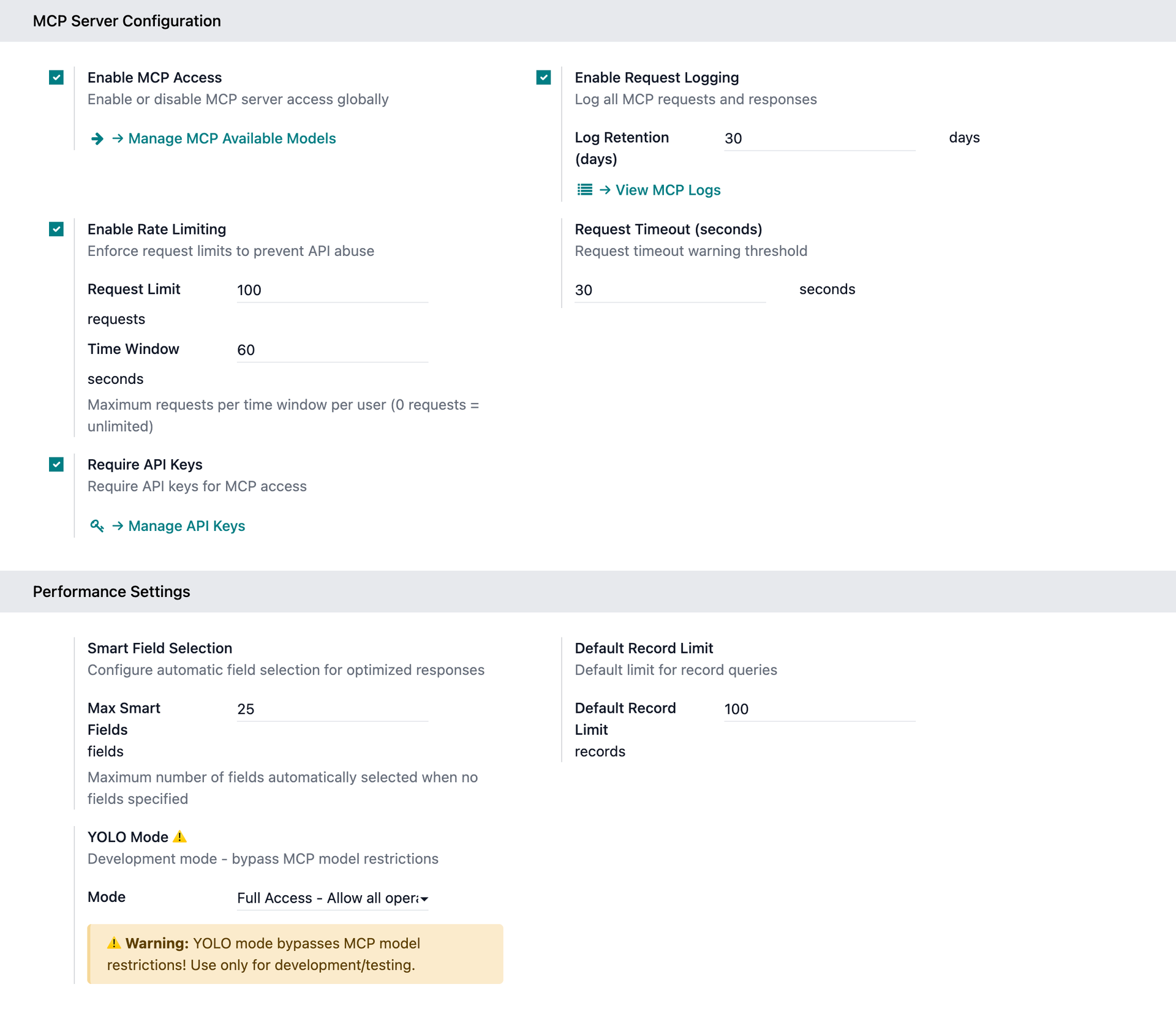
Navigate to Settings → MCP Server to configure access, rate limiting, logging, and more.
🔑 Secure API Key Management
Generate, track, and manage access keys with granular control
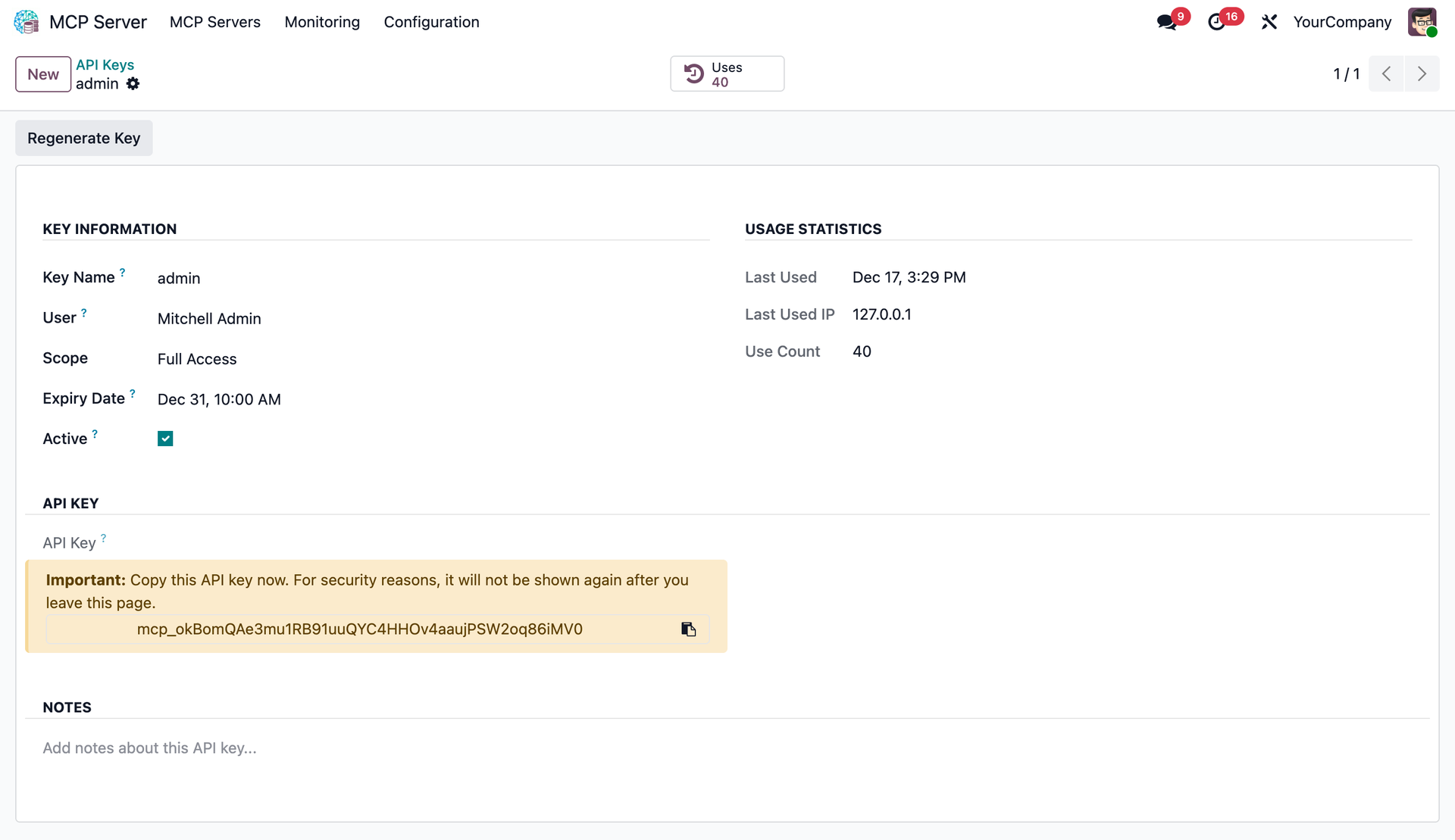
User-Specific
Keys tied to users respecting Odoo access rights.
Scopes
Restrict to Read-Only or Full Access.
Usage Tracking
Monitor IP, date, and request counts.
Auto-Validation
Secure hashing and expiration handling.
🎛️ Granular Model Control
Precisely define which Odoo models and fields are exposed
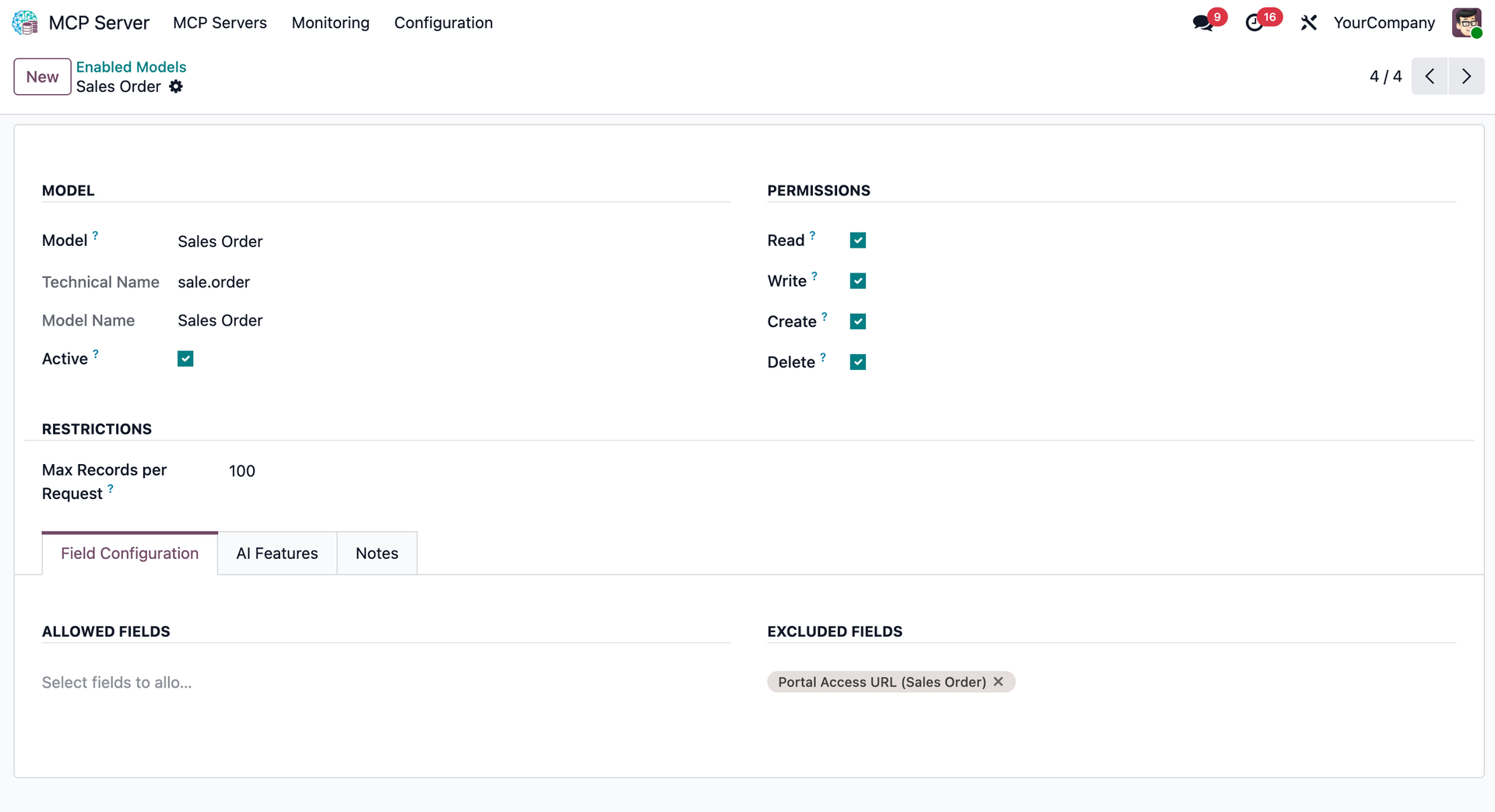
Per-Model Permissions
Toggle Read, Write, Create, Delete per model.
Field Filtering
Whitelist or blacklist specific fields.
AI Context Hints
Define Important Fields for AI.
AI Descriptions
Custom LLM instructions per model.
📋 Complete Audit Trail
Monitor every AI interaction with full transparency
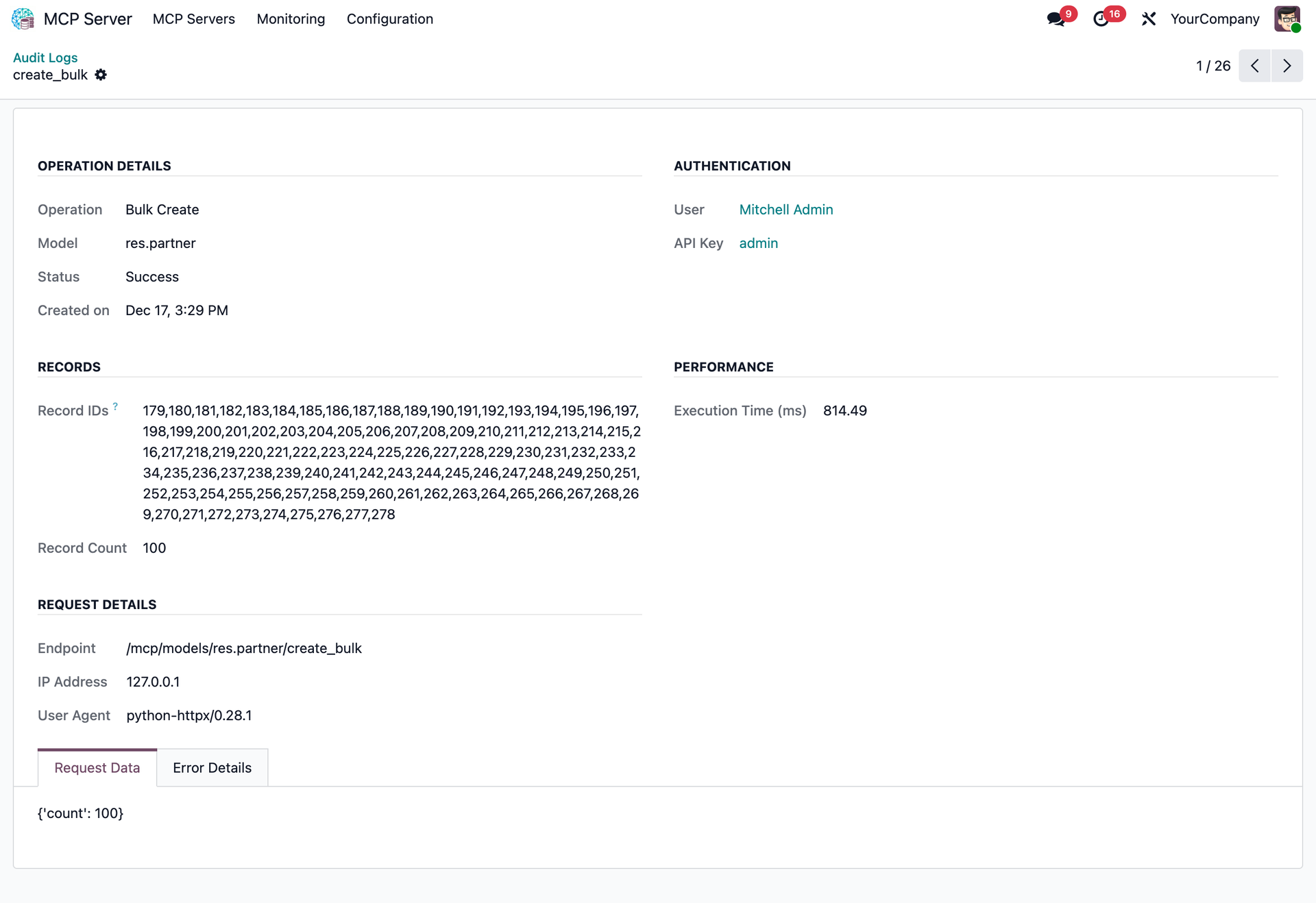
Performance Stats
Track execution time and latency for every request.
User Attribution
See exactly which user and API key initiated the action.
Payload Inspection
View full JSON request and response payloads for debugging.
Security Events
Log failed authentication attempts and permission denials.
🖥️ Works with ANY MCP-Compatible AI
One integration, endless possibilities
Claude Desktop
Cursor
VS Code
Windsurf
Zed
Any MCP Client
🐍 PyPI Package Configuration
Install our official Python package: pip install yt-mcp-server-odoo
📦 PyPI: https://pypi.org/project/yt-mcp-server-odoo/
⚙️ Environment Variables
| Variable | Default | Description |
|---|---|---|
| ODOO_URL | http://localhost:8069 | Odoo server URL |
| ODOO_DB | - | Database name |
| ODOO_API_KEY | - | MCP API key (recommended) |
| ODOO_USER | - | Username (alt auth) |
| ODOO_PASSWORD | - | Password (alt auth) |
| MCP_TRANSPORT | stdio | stdio or streamable-http |
| MCP_HOST | localhost | Host for HTTP mode |
| MCP_PORT | 8000 | Port for HTTP mode |
🚀 Performance Settings
| Variable | Default | Description |
|---|---|---|
| DEFAULT_LIMIT | 10 | Default records per query |
| MAX_LIMIT | 100 | Maximum records per query |
| MAX_SMART_FIELDS | 25 | Auto-selected fields limit |
⚠️ YOLO Mode (Development)
Bypass MCP model restrictions for development/testing:
| ODOO_YOLO Value | Effect |
|---|---|
| off | Disabled (default, production) |
| read | Read all models, write enabled only |
| true | Full access to all models |
📖 Full documentation and IDE setup guides available on PyPI
https://pypi.org/project/yt-mcp-server-odoo/
📡 REST API Endpoints
| Endpoint | Method | Description |
|---|---|---|
/mcp/models |
GET | List enabled models with metadata |
/mcp/models/{model}/search |
POST | Search records with domain filters |
/mcp/models/{model}/read |
POST | Read a single record by ID |
/mcp/models/{model}/browse |
POST | Get multiple records by IDs |
/mcp/models/{model}/count |
POST | Count records matching domain |
/mcp/models/{model}/create |
POST | Create a new record |
/mcp/models/{model}/create_bulk |
POST | Create multiple records at once |
/mcp/models/{model}/write |
POST | Update an existing record |
/mcp/models/{model}/write_bulk |
POST | Update multiple records |
/mcp/models/{model}/unlink |
POST | Delete a record |
/mcp/prompts |
GET | List prompt templates |
Ready to Connect AI to Your Odoo?
Transform your Odoo experience with AI-powered data access. Install now!
Official PyPI Package
pip install yt-mcp-server-odoo
by Yugma Tech
Easy Integration
Works with any MCP-compatible AI
5-Minute Setup
Install, configure, and start querying!


