
Cancel Invoice Payment
by Yugma Tech📋 Cancel Invoice Payment
Flexible Invoice and Payment Cancellation with Configuration Options
✨ Overview
Take full control of your invoice and payment cancellation process with this powerful Odoo module. Unlike the standard Odoo functionality, this module allows you to cancel invoices along with their linked payments in one action, with flexible configuration options to suit your business needs.
🎯 Key Features
Cancel Linked Payments
Automatically cancel all payments linked to an invoice when you cancel the invoice.
Restore Cancelled Records
Easily restore cancelled invoices and payments back to draft state for reuse.
Complete Deletion
Fully delete cancelled records with one click, keeping your database clean.
Bulk Operations
Cancel multiple invoices at once from the list view using the Actions menu.
Configurable Behavior
Set system-wide operation types from Settings → Invoicing.
Separate Controls
Configure invoice and payment operations independently.
⚙️ Configuration Options
Navigate to Settings → Invoicing → Invoice & Payment Cancellation
Invoice Operation Type
Payment Operation Type
📸 Screenshots
1️⃣ Configuration Settings
Configure invoice and payment cancellation behavior from Settings → Invoicing → Invoice & Payment Cancellation
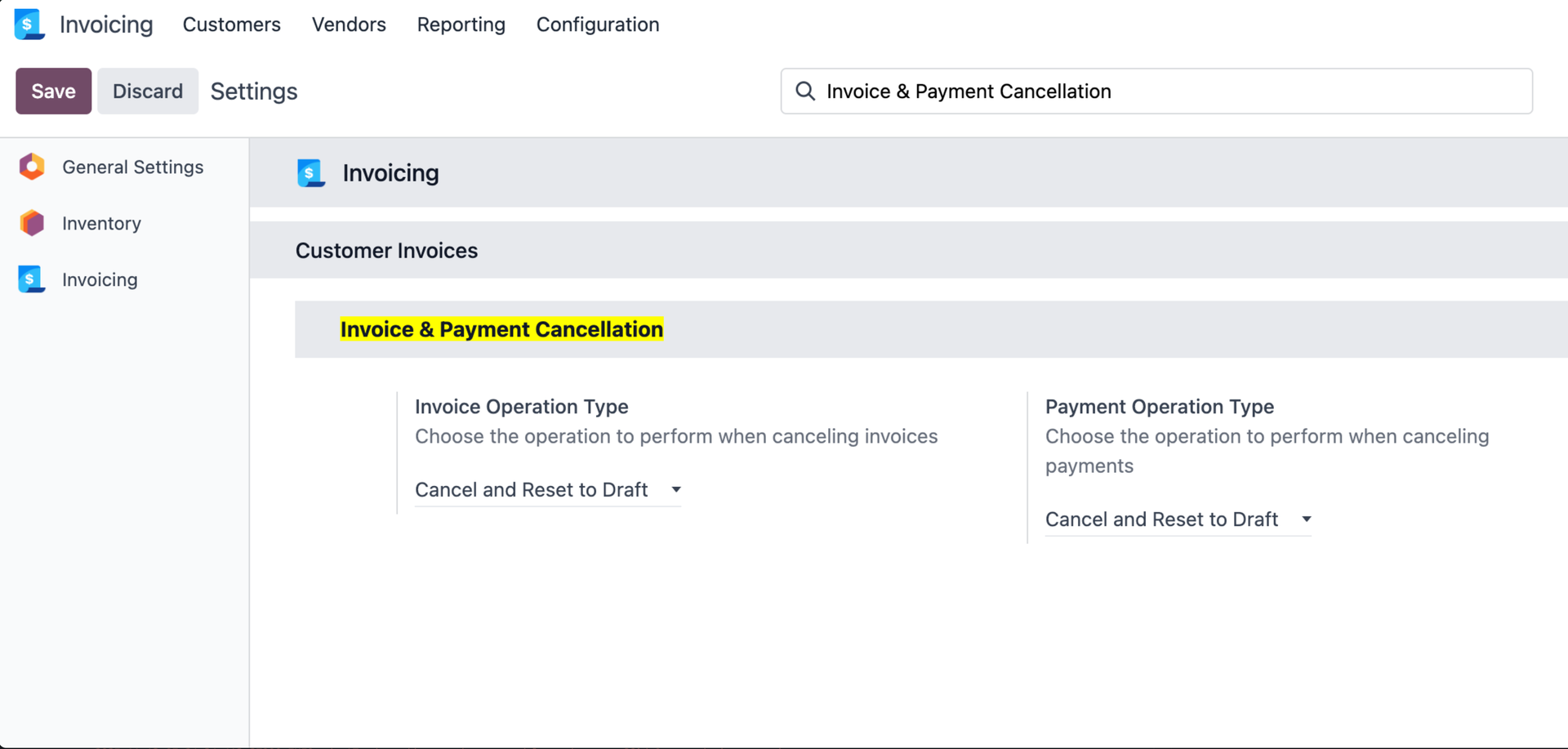
Choose your preferred operation type for invoices and payments
2️⃣ Bulk Actions Menu
Select multiple invoices and use the Actions menu to cancel them in bulk
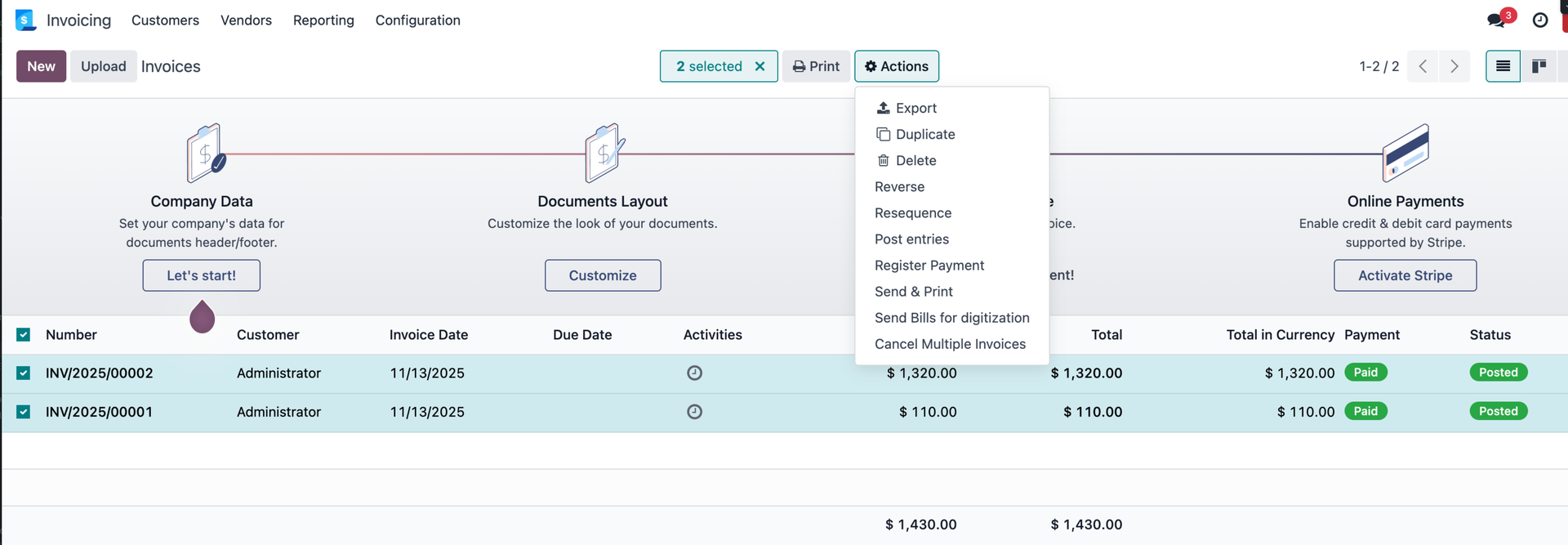
"Cancel Multiple Invoices" action respects your configuration settings
3️⃣ After Cancellation (Reset to Draft)
Invoices are automatically reset to draft state when using "Cancel and Reset to Draft" option
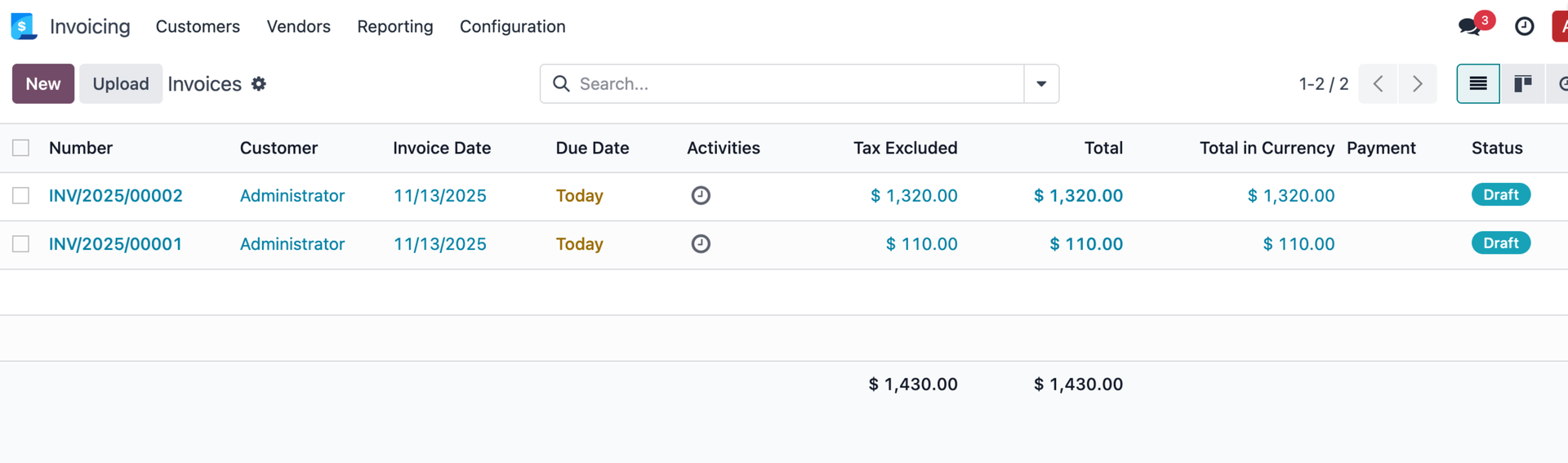
Invoices successfully cancelled and reset to draft for modification
📖 How to Use
Restore Cancelled Invoice
- Open a cancelled invoice
- Click the "Restore Cancelled" button
- The invoice will be restored to draft state
Bulk Cancellation
- Go to Accounting → Customers → Invoices (or Vendor Bills)
- Select multiple invoices using checkboxes
- Click Actions dropdown menu
- Choose "Cancel Multiple Invoices"
- All selected invoices will be processed according to your configuration
🔧 Technical Specifications
Dependencies
account- Invoicing/Accountingstock- Inventorymail- Messaging
Features
- ✅ Works with Customer Invoices, Vendor Bills, and Receipts
- ✅ Handles payment reconciliation automatically
- ✅ Clean database by removing unwanted records
- ✅ No conflicts with standard Odoo functionality
- ✅ Multi-company support
📥 Installation
- Download and extract the module to your Odoo addons directory
- Update the Apps list: Apps → Update Apps List
- Search for "Cancel Invoice Payment" in the Apps menu
- Click Install
- Configure the module: Settings → Invoicing → Invoice & Payment Cancellation
⚠️ Important Notes
🆘 Support & Contact
Need help with this module or looking for Odoo services? We're here to assist!
📦 Module Support
- 📧 Email support for installation and configuration issues
- 🐛 Bug reports and feature requests welcome
- 📚 Detailed documentation included in README.md
- 🔄 Regular updates for compatibility and new features
- ⚡ Fast response time for urgent issues
🎯 Our Odoo Services
Yugma Tech - Your Complete Odoo Solutions Partner
Odoo Customization
Tailored solutions to match your unique business processes and requirements.
Odoo Migration
Seamless migration between Odoo versions with zero data loss and minimal downtime.
Implementation
Complete Odoo implementation from requirement analysis to deployment and training.
Development
Custom module development, API integrations, and third-party app connections.
Consulting
Expert Odoo consulting to optimize your business workflows and maximize ROI.
Support & Maintenance
Ongoing support, troubleshooting, performance optimization, and system maintenance.
🚀 Ready to Simplify Your Invoice Management?
Install now and experience the flexibility of configurable invoice cancellation!
📞 Need Custom Odoo Solutions?
Contact Yugma Tech for customization, migration, implementation, and support services.
📧 hello@yugmatech.com | 🌐 www.yugmatech.com


