

Project Stage History Logs
by Yugma Tech📊 Project Stage History Logs
Track Project Progression and Analyze Stage Transitions with Comprehensive History Reports
🎯 Overview
The Project Stage History Logs module helps users track the history of project stage changes. Users can observe the transition of projects from one stage to another. This information enables project managers and team members to analyze the progression of projects and identify patterns or areas for improvement in their workflows.
📸 Screenshots
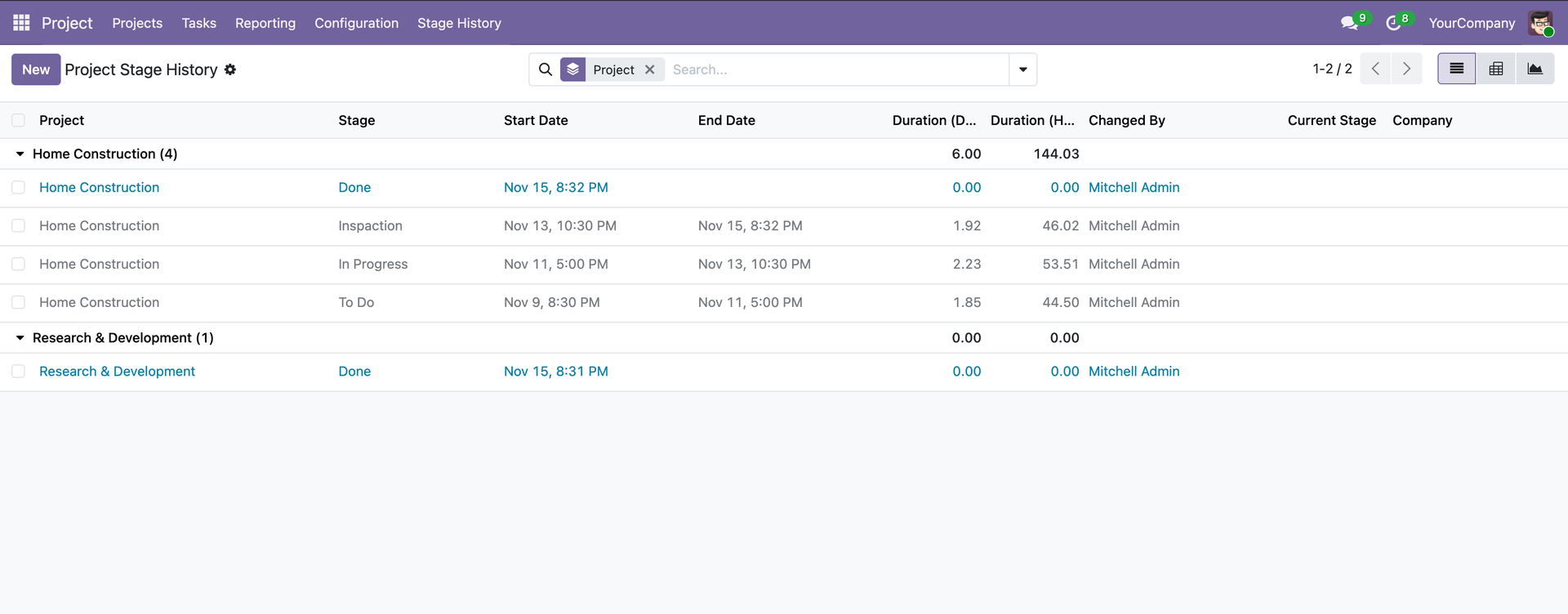
📋 Comprehensive Stage History Reports
View all project stage transitions in one comprehensive list. The history is automatically grouped by project, making it easy to track progression across your entire portfolio. Each record shows:
- Stage Name - Which stage the project was in
- Start & End Dates - Precise timestamps for each transition
- Duration in Days & Hours - Exact time spent in each stage
- Changed By - User accountability for every stage change
- Current Stage Indicator - Highlighted rows show active stages
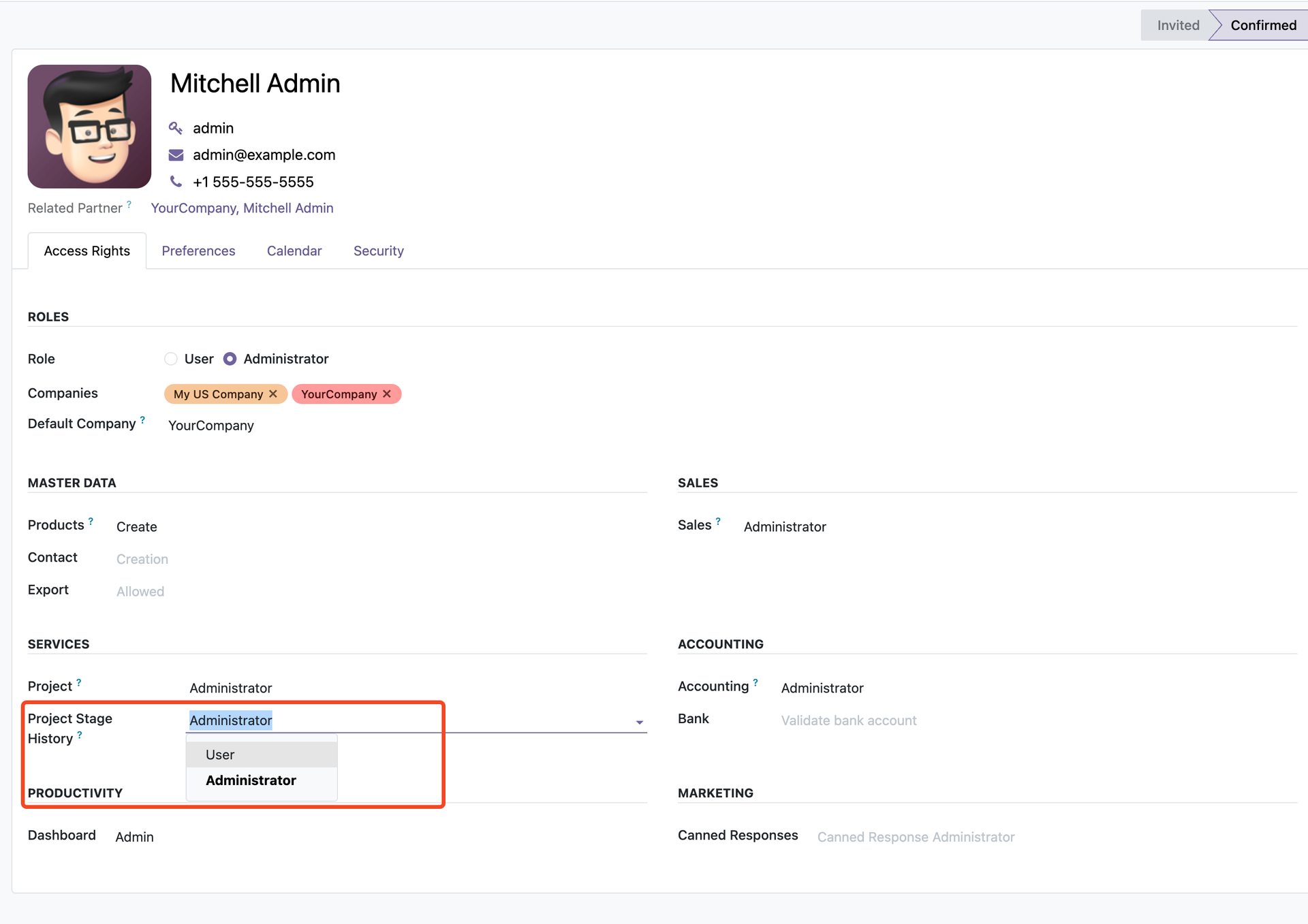
🔐 Flexible Access Control
Configure user access levels directly from the user settings page. The module integrates seamlessly with Odoo's security system under the SERVICES category, providing granular control over who can view and manage stage history.
View stage history for projects they have access to
Full access to manage all stage history features
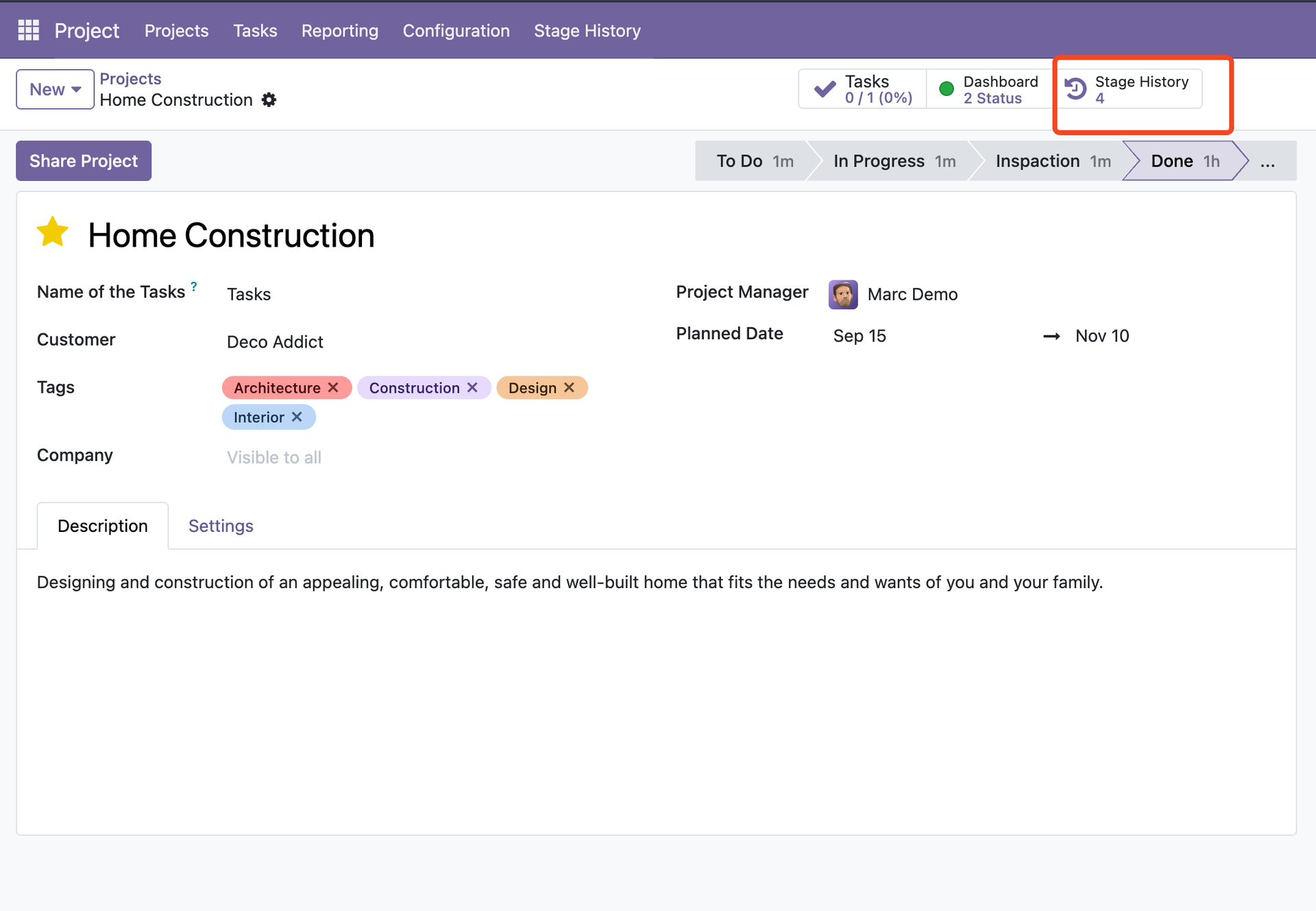
⚡ Quick Access with Smart Button
A beautifully integrated smart button appears at the top of every project form, showing the total number of stage history records at a glance. Click the button to instantly open the full stage history with advanced filtering, pivot tables, and graph visualizations.
Detailed records
Aggregated data
Visual insights
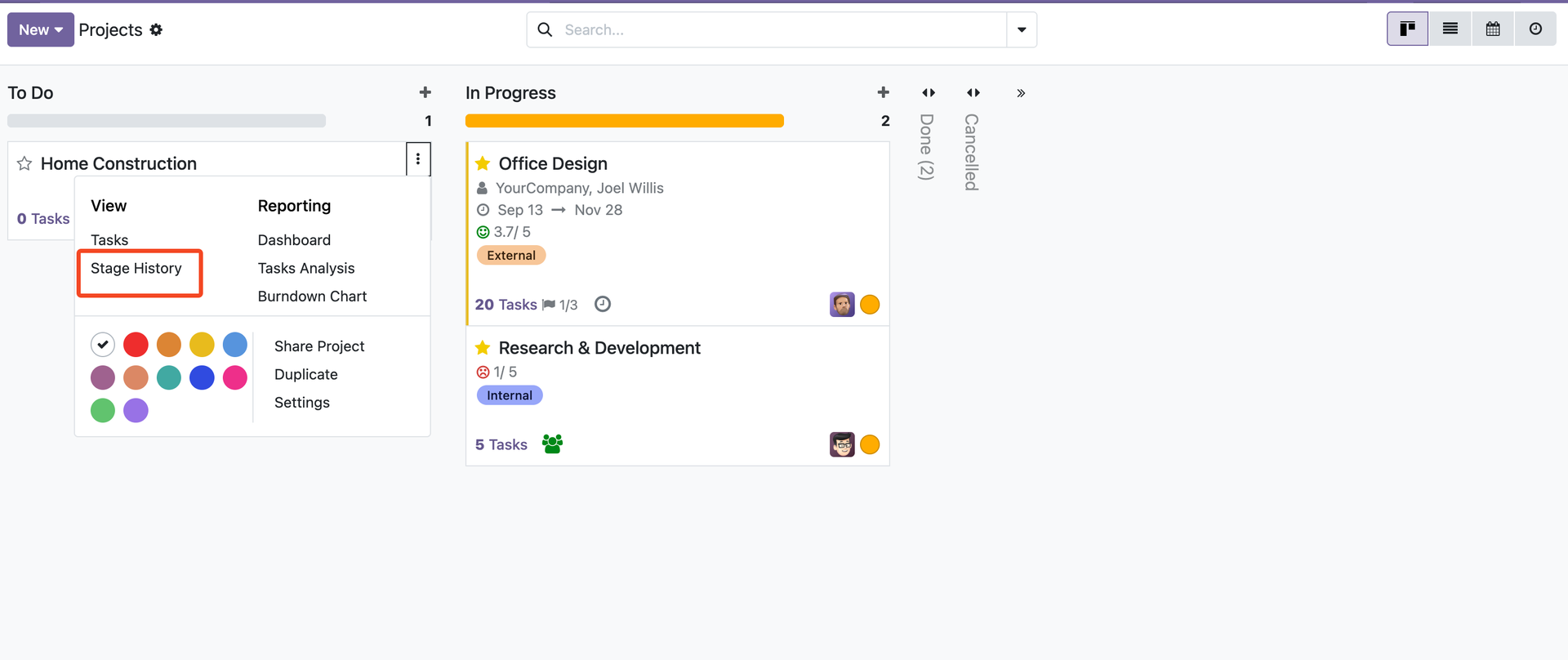
🎯 Convenient Kanban Access
Access stage history directly from the Kanban board! Click the three-dot menu (⋮) on any project card, and you'll find the Stage History option right in the View section, alongside Tasks and Reporting options. Perfect for quick checks without leaving your workflow.
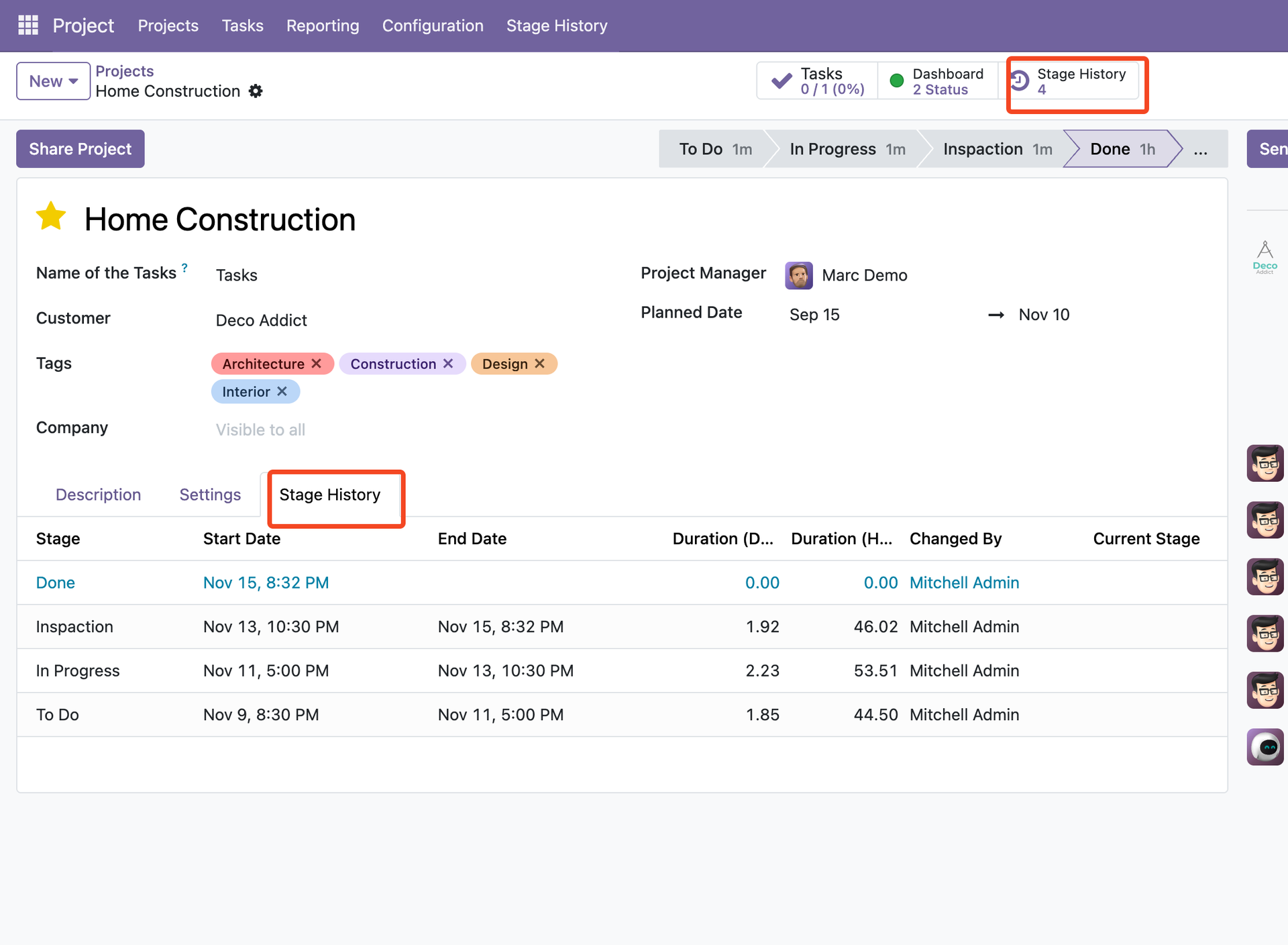
📑 Dedicated Stage History Tab
Every project gets its own Stage History tab, conveniently located right after the Settings tab. View the complete timeline of stage transitions without navigating away from the project. The current stage is highlighted in blue for instant visibility.
Name of each stage
Days & hours tracked
Start and end times
Who made changes
🚀 Ready to Transform Your Project Management?
Get complete visibility into your project workflows with automatic stage tracking, powerful analytics, and beautiful reporting.
✨ Key Features
⏱️ Duration Measurement
Measure project duration within each stage accurately.
- Track time spent in each stage
- Duration in days and hours
- Real-time current stage duration
- Historical duration analysis
📝 Stage Change Tracking
Complete history of all project stage transitions.
- Automatic stage change logging
- User who made the change
- Start and end dates for each stage
- Current stage indicator
📊 Comprehensive Reports
Powerful reporting capabilities for analysis.
- List view with filters
- Pivot table analysis
- Graph visualization
- Group by project, stage, or date
🎨 Easy to Use
Intuitive interface with powerful features.
- Integrated in project form
- Quick access from project list
- Visual indicators for current stage
- Search and filter capabilities
⚙️ Configurable
Flexible configuration options.
- Multi-company support
- Role-based access control
- Customizable views
- Export capabilities
🔧 Edition Support
Works with both Odoo editions.
- Community Edition support
- Enterprise Edition support
- Full feature parity
- No additional dependencies
🎓 Use Cases
📈 Performance Analysis
Analyze project progression patterns and identify bottlenecks
⏰ Time Tracking
Measure time spent in each project stage
🔍 Workflow Optimization
Identify areas for improvement in project workflows
📊 Reporting
Generate comprehensive reports for stakeholders
🎯 Project Management
Track project lifecycle transitions and milestones
📋 Audit Trail
Maintain complete history of project stage changes
🔄 Workflow
- Automatic Tracking: Stage changes are automatically logged when projects move between stages
- Duration Calculation: System calculates time spent in each stage automatically
- View History: Access stage history from project form or dedicated menu
- Analyze Data: Use pivot and graph views to analyze stage transitions
- Generate Reports: Export data and create custom reports for stakeholders
- Optimize Workflows: Use insights to improve project management processes
💡 Benefits
- Complete Visibility: Track every stage transition with full audit trail
- Performance Insights: Identify bottlenecks and optimize project workflows
- Time Management: Measure and analyze time spent in each project stage
- Data-Driven Decisions: Make informed decisions based on historical data
- Reporting Excellence: Generate comprehensive reports with pivot and graph views
- Easy Integration: Seamlessly integrated into existing project management workflow
- Multi-Company Support: Works across multiple companies and projects
- User Accountability: Track who changed project stages and when
📦 Installation
Requirements
| Dependency | Description |
|---|---|
| Project | Core Odoo Project module |
| Discuss (Mail) | Odoo messaging and chatter functionality |
Installation Steps
- Download the module from the Odoo Apps Store
- Upload to your Odoo instance's addons directory
- Update the apps list
- Install "Project Stage History Logs"
- Access stage history from Project → Stage History menu or from project form
🔧 Configuration
Access Rights
The module provides two access levels:
| Group | Permissions |
|---|---|
| User | Can view stage history logs for projects they have access to |
| Administrator | Can view, create, edit, and delete stage history logs |
Usage
Navigate to: Project → Stage History
Or access from project form: Project Form → Stage History Tab
The module automatically tracks stage changes when:
- New Projects: Initial stage is logged when project is created
- Stage Changes: Every stage transition is automatically recorded
- Duration Calculation: Time spent in each stage is calculated automatically
📝 Usage
For Project Users
- Open any project from the project list
- Navigate to the Stage History tab
- View all stage transitions with dates and duration
- See who changed the stage and when
- Monitor current stage duration in real-time
For Project Managers
- Access Project → Stage History menu
- View all stage history logs across all projects
- Use filters to find specific projects or stages
- Switch to Pivot view for aggregated analysis
- Use Graph view for visual representation
- Export data for external analysis
📊 Reports & Analysis
List View
View all stage history logs in a comprehensive list with columns for:
- Project name
- Stage name
- Start and end dates
- Duration in days and hours
- User who made the change
- Current stage indicator
Pivot View
Analyze stage history data with pivot tables:
- Group by stage, project, or date
- Measure duration and count transitions
- Identify patterns and trends
- Export pivot data
Graph View
Visualize stage history with graphs:
- Bar charts for duration analysis
- Stage distribution visualization
- Time-based trends
- Interactive charts
🆘 Support & Documentation
For support, questions, or feature requests, please contact:
- Email: hello@yugmatech.com
- Website: https://yugmatech.com
We're committed to providing excellent support and continuously improving our modules based on your feedback.


