

Chatter Message Collapse/Expand
by Yugma Tech
💬 Chatter Message Collapse/Expand
Organize Your Messages with One Click - Hide Less Important Messages for Better Visibility
✨ Odoo 19.0 | Community & Enterprise✨ Powerful Features
Collapse/Expand Button
Each message has a prominent collapse/expand button with blue and green highlight when collapsed. Large, easy-to-click button with visual highlight and one-click toggle.
Persistent State
Collapsed state saved in database at message level. Persists across page refreshes, shared with all users, with automatic state management.
Better Visibility
Hide less important messages to focus on what matters. Reduce visual clutter, improve readability, and focus on important content.
Seamless Integration
Works seamlessly with existing Odoo chatter interface. No configuration needed, native feel, and easy upgradability.
Multi-User Support
Collapsed state shared across all users for consistent organization. Team-wide organization with consistent view and collaborative filtering.
Secure Access
Read access required - portal users and clients can collapse messages. Secure implementation, portal user friendly, with access control maintained.
📸 See It In Action
Real screenshots from Odoo showing how the module works. Transform your chatter experience with one-click message organization.
💬 Collapse/Expand with Long Emails and Messages
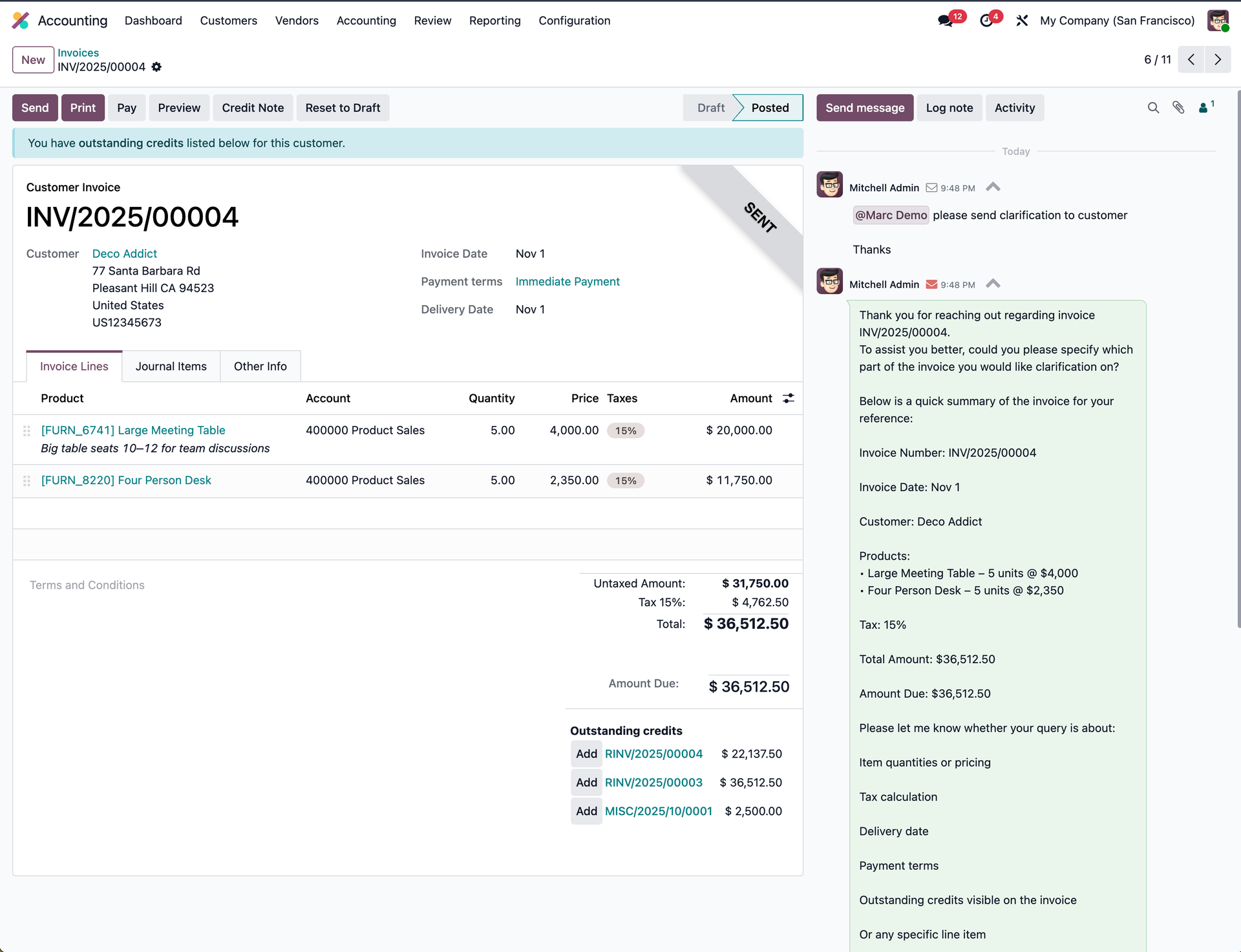
Organize Long Messages Instantly
Collapse lengthy emails and log notes with one click. Reduce clutter, focus on what matters, and improve productivity. The collapsed state is automatically saved and shared with your entire team for consistent organization.
🔴 Highlighted Expand Button for Collapsed Messages

Highly Visible Expand Button
Collapsed messages feature a prominent red highlight on the expand button, making it instantly clear which messages are collapsed. One click to expand, zero confusion - perfect for busy chatter logs.
🚀 Why Choose This App?
Improved Readability
Focus on important messages by hiding less relevant content
Reduced Clutter
Clean up busy chatter logs for better organization
Persistent Organization
Your preferences saved and shared across all users
Time Savings
Quickly organize long conversation threads
📝 How It Works
Install Module
Simply install the module from Odoo Apps. No configuration needed.
Click to Collapse
Click the arrow button next to any message to collapse or expand it.
State Saved
Your preferences are automatically saved and shared with all users.
💼 Use Cases
Long Threads
Hide less important messages in long conversation threads
Focus on Important
Focus on recent or important messages
Activity Feeds
Reduce visual clutter in busy activity feeds
Team Organization
Better organization of activity feed for teams
⚙️ Technical Specifications
🔌 Integration
- ✓ Works with Odoo chatter interface
- ✓ All records with chatter support
- ✓ Sales Orders & Quotations
- ✓ Purchase Orders & RFQs
- ✓ Customer Invoices & Vendor Bills
- ✓ Inventory & Stock Operations
- ✓ Any module with chatter enabled
📦 Module Details
- ✓ Technical Name: yt_chatter_collapse
- ✓ Version: 19.0.1.0.0
- ✓ License: OPL-1
- ✓ Dependencies: mail (Discuss)
- ✓ Category: Discuss
🎨 UI/UX Features
- ✓ Prominent collapse/expand button
- ✓ Visual highlight when collapsed
- ✓ One-click toggle functionality
- ✓ Red highlight for collapsed messages
- ✓ Seamless integration with Odoo UI
🔧 Key Capabilities
- ✓ Message-level collapse state
- ✓ Database persistence
- ✓ Shared state across users
- ✓ Portal user support
- ✓ Automatic state management
💡 Overview
The Chatter Message Collapse/Expand module enhances Odoo's standard chatter interface by adding collapse/expand functionality to individual messages. This powerful feature allows you to organize your conversation threads by hiding less important messages, making it easier to focus on what matters most.
Perfect for businesses with long conversation threads, busy activity feeds, or teams that need to organize their chatter messages for better productivity. The collapsed state is stored in the database, ensuring your organization preferences are maintained across sessions and shared with your entire team.
📥 Installation
Simple installation process with no configuration required.
📋 Requirements
| Dependency | Description |
|---|---|
| Discuss (mail) | Core Odoo messaging functionality |
📋 Installation Steps
- Purchase and download the module from the Odoo Apps Store
- Upload to your Odoo instance's addons directory (or use the Apps interface for Odoo.sh/Online)
- Update the apps list (Apps → Update Apps List)
- Search for "Chatter Message Collapse/Expand" and click Install
- Navigate to any record with chatter to see the new collapse/expand buttons
Ready to Organize Your Chatter?
Install Chatter Message Collapse/Expand today and transform your messaging experience!
💬 Professional Support
Need help or customization?
Email: hello@yugmatech.com
Website: www.yugmatech.com


