

Global Analytic Distribution | All in One Analytic Distribution
by Yugma Tech📊 Global Analytic Distribution
Set analytic distribution on Purchase, Sale, Bill, Invoice, and Journal Entry headers and automatically pass it to each created line. Update all lines with a single click!
✨ Odoo 19.0 | Community & Enterprise✅ Works Seamlessly Across All Document Types:
🎯 Use Case
This module enables you to set analytic distribution on Sale, Purchase, Invoice, Bills, and Journal Entry records and pass it to each created line. You can also update lines' analytic distribution with the main analytic distribution with a single click.
📄 Supported Document Types
This module works seamlessly across all major Odoo document types. Set analytic distribution once at the header level and it automatically applies to all lines!
Sale Orders
Set analytic distribution on sale orders and automatically apply it to all order lines. Perfect for tracking sales by project or department.
✓ SupportedPurchase Orders
Manage analytic distribution on purchase orders and vendor RFQs. Automatically distribute to all purchase lines automatically.
✓ SupportedInvoices
Set analytic distribution on customer invoices and credit notes. All invoice lines inherit the header distribution automatically.
✓ SupportedVendor Bills
Apply analytic distribution on vendor bills and refunds. Update all bill lines with a single click from the header.
✓ Supported✨ Key Features
Header-Level Distribution
Set analytic distribution on Sale, Purchase, Invoice, Bill, and Journal Entry records, and automatically pass it to lines.
Auto-Apply to Lines
Automatically set the analytic distribution from the main record to the line analytic distribution when creating a new line.
One-Click Update
Update all lines' analytic distribution to match the main record's analytic distribution with a single click.
📖 User Guide
📝 Step 1: Set Analytic Distribution on Header
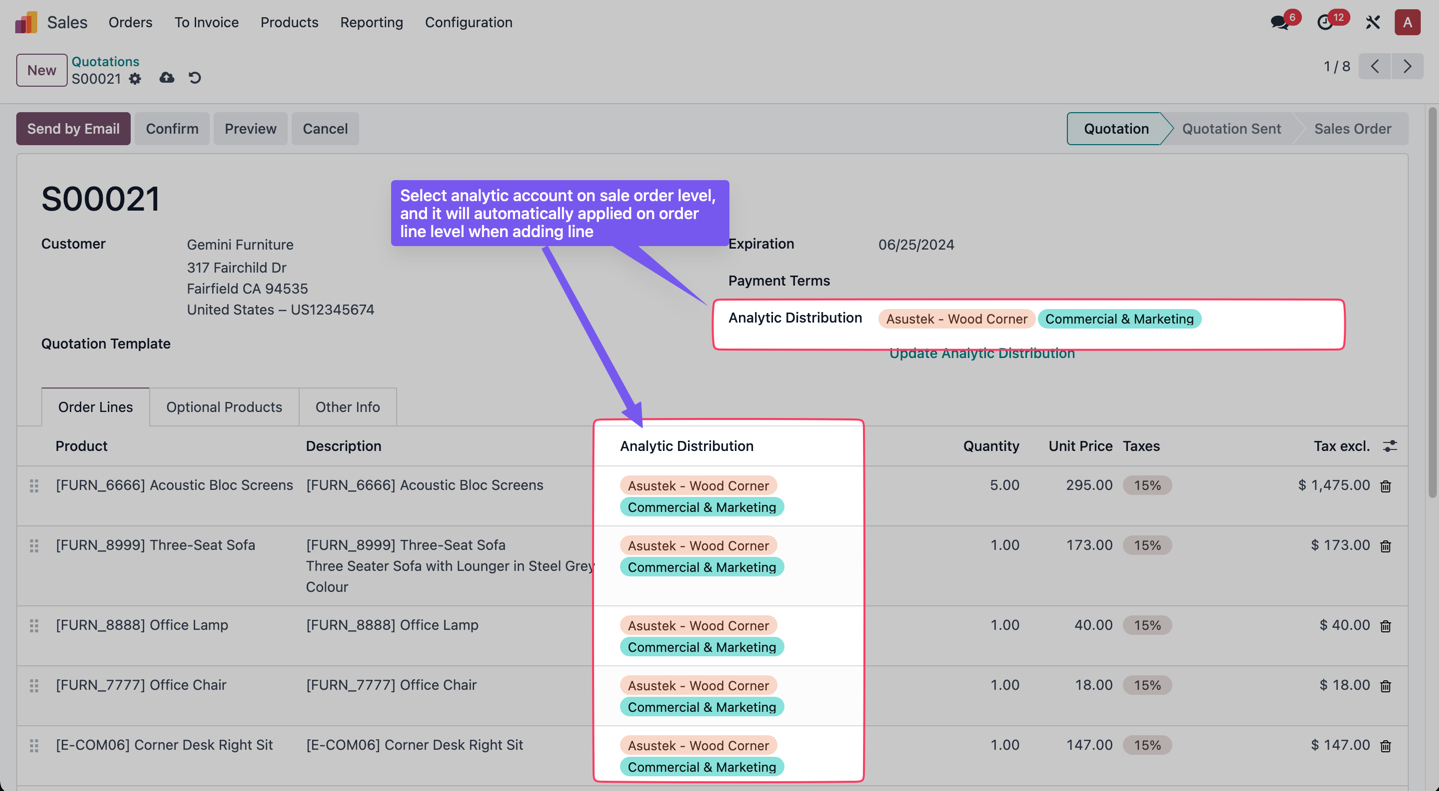
Select analytic account on sale order level (or purchase order, invoice, bill, journal entry), and it will automatically be applied on order line level when adding a line. You can even change it manually in the line if you want.
🔄 Step 2: Update All Lines with One Click
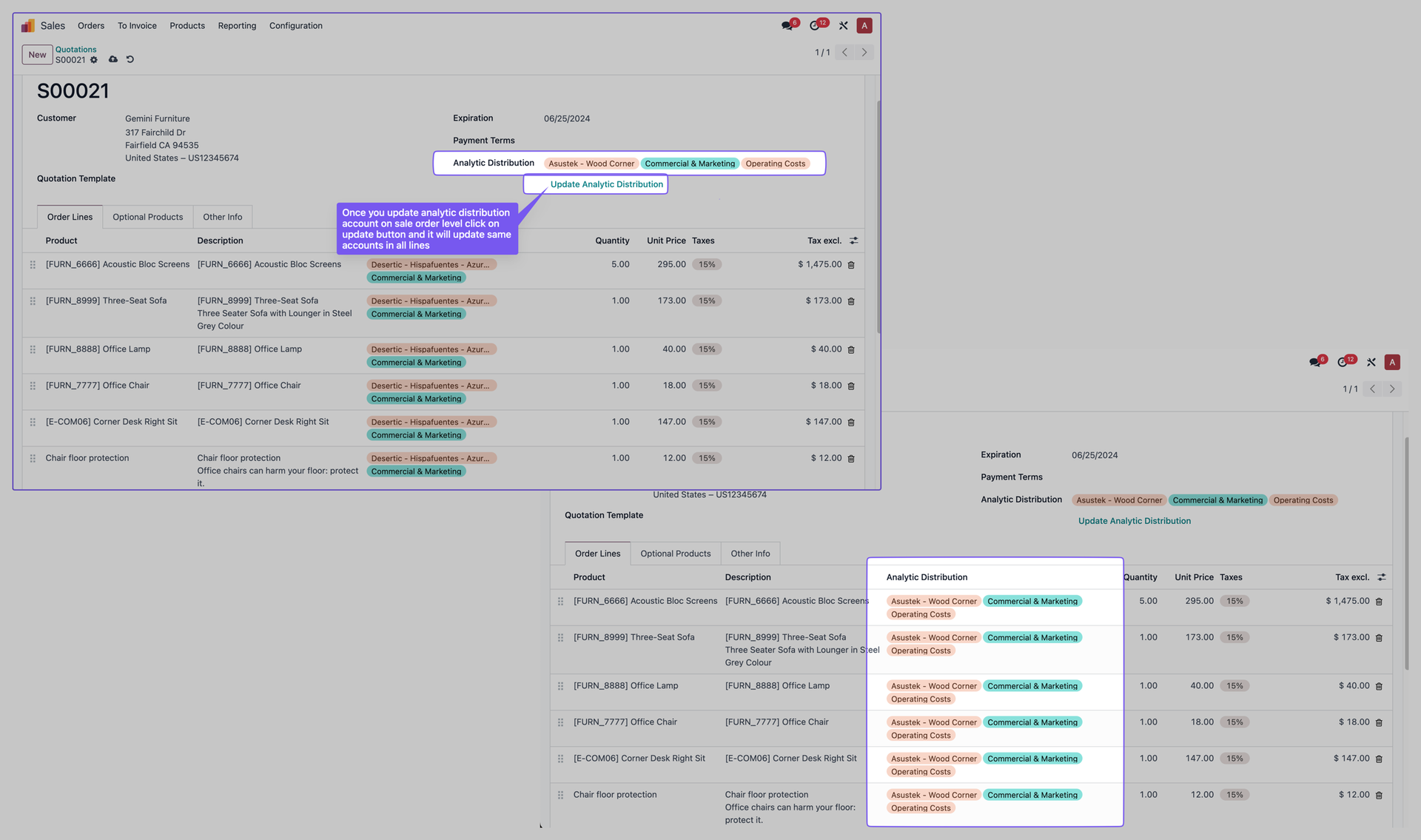
If you want to update analytic distribution on all order lines, just select the distribution account on the sale order level and click on the "Update Analytic Distribution" button shown in the picture. It will update the same accounts in all lines.
✅ Works on All Document Types!
You can perform the same action on Sale Orders, Purchase Orders, Invoices, Bills, and Journal Entries. The functionality is identical across all document types!
🚀 Why Choose This App?
Time Saving
Update all lines' analytic distribution with a single click instead of manually updating each line
Accuracy
Ensure consistent analytic distribution across all lines automatically
Universal Support
Sale Orders, Purchase Orders, Invoices, Bills, and Journal Entries - all supported!
Easy to Use
Simple interface with intuitive one-click update functionality
📝 How It Works
Set Distribution
Open any Sale Order, Purchase Order, Invoice, Bill, or Journal Entry and set the analytic distribution on the header level.
Auto-Apply
When you add a new line, the analytic distribution from the header is automatically applied to that line.
Manual Override
If needed, you can manually change the analytic distribution on individual lines.
Bulk Update
Click the "Update Analytic Distribution" button to update all existing lines with the header's distribution.
⚙️ Technical Specifications
🔌 Module Integration
- ✓ Sale Orders & Quotations
- ✓ Purchase Orders & RFQs
- ✓ Customer Invoices
- ✓ Vendor Bills
- ✓ Journal Entries
- ✓ Refunds (Invoices & Bills)
📦 Module Details
- ✓ Technical Name: yt_globle_analytic_distribution
- ✓ Version: 19.0.1.0
- ✓ License: OPL-1
- ✓ Dependencies: account, sale, purchase, analytic
- ✓ Category: Accounting
Ready to Streamline Your Analytic Distribution?
Install Global Analytic Distribution today and manage your analytic accounts efficiently across all your documents!


