
Customer Account Statement And Email Report
by Yugma Tech
📊 Partner Account Statement
Generate Professional Customer Statements - Track Balances, Invoices & Payments with PDF Export & Email
✨ Odoo 19.0 | Community & Enterprise100%
Accurate Calculations
1-Click
Email Sending
Multi
Company Support
0
Configuration Needed
✨ Key Features
Flexible Date Range
Select any date range to generate statements. Custom start and end dates with automatic opening balance calculation and period-specific transactions.
Running Balance Tracking
Real-time balance calculation for each transaction. Display opening balance, track transaction-by-transaction, and show outstanding balance summary.
Professional PDF Reports
Beautiful, professional statement layout with company branding, clear transaction tables, and comprehensive financial summary section.
Email Integration
Send statements directly to customers via email with customizable email templates, automatic PDF attachment, and professional email formatting.
Complete Transaction History
Track all financial activity with customers including invoices and due amounts, credit notes applied, and payments received.
Easy Access
Generate statements directly from partner records with one-click access from partner form. No configuration required - instant report generation.
⭐ Why Choose This Module?
Professional customer statements with comprehensive transaction history. Generate detailed PDF reports, track opening balances, monitor invoices and payments, and send via customizable email templates. Perfect for maintaining transparent customer relationships.
🎯 Overview
The Partner Account Statement & Email Report module provides a complete solution for generating and distributing professional customer account statements. This powerful tool allows you to create detailed financial summaries showing opening balances, all transactions within a selected date range, running balances, and outstanding amounts.
Perfect for accounting teams, finance departments, and AR managers who need to provide customers with clear, professional statements. Accessible directly from customer records with customizable date ranges and professional PDF formatting.
📸 See It In Action
Real screenshots showing how to generate and send professional customer account statements.
👤 Generate Statement from Contact Action
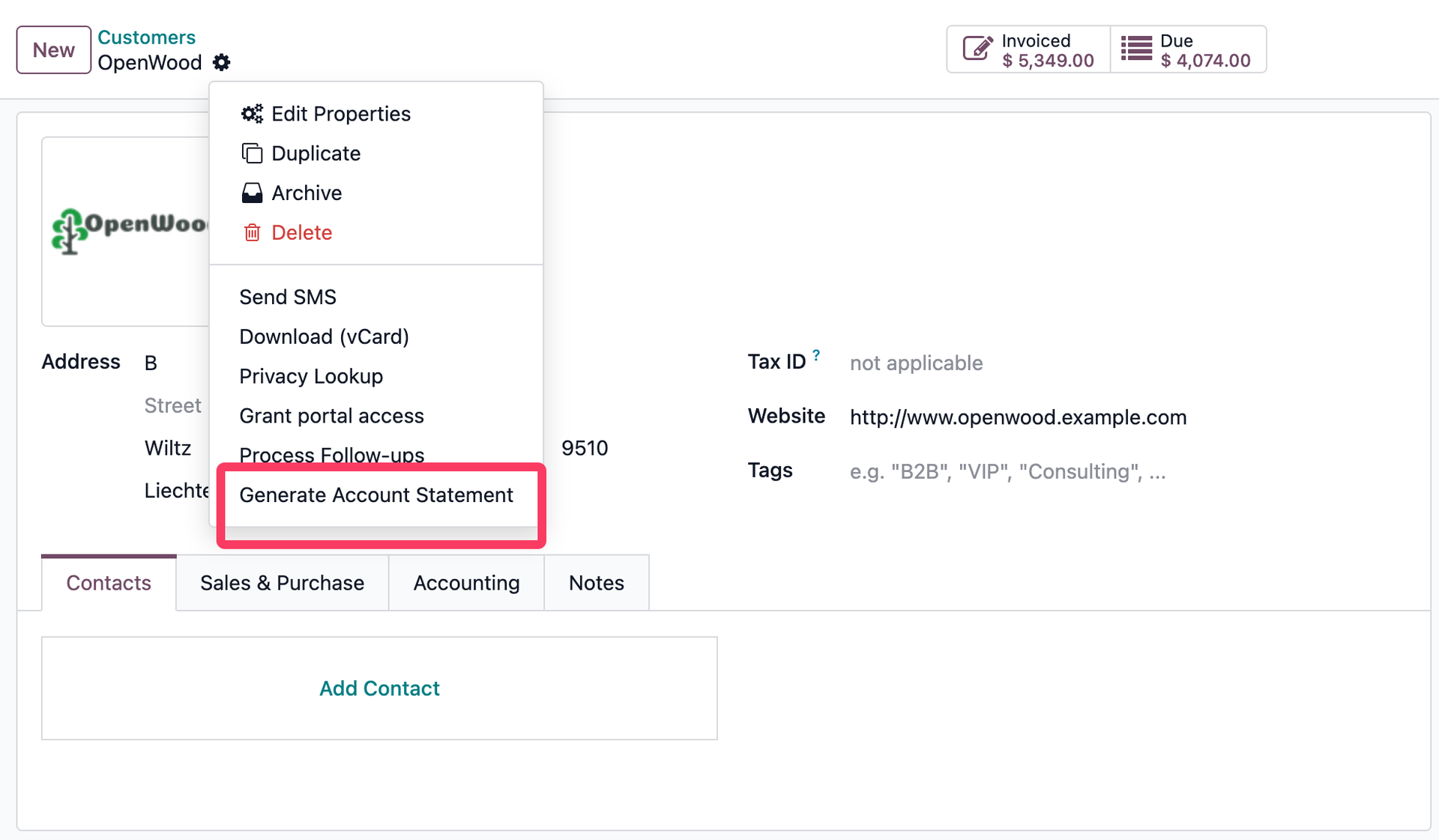
One-Click Access
Generate customer statements directly from any contact or partner record. Simply click the "Generate Statement" action button in the partner form, and the statement wizard opens instantly. No need to navigate through multiple menus - access statements right where you need them.
📋 Statement Generation Wizard
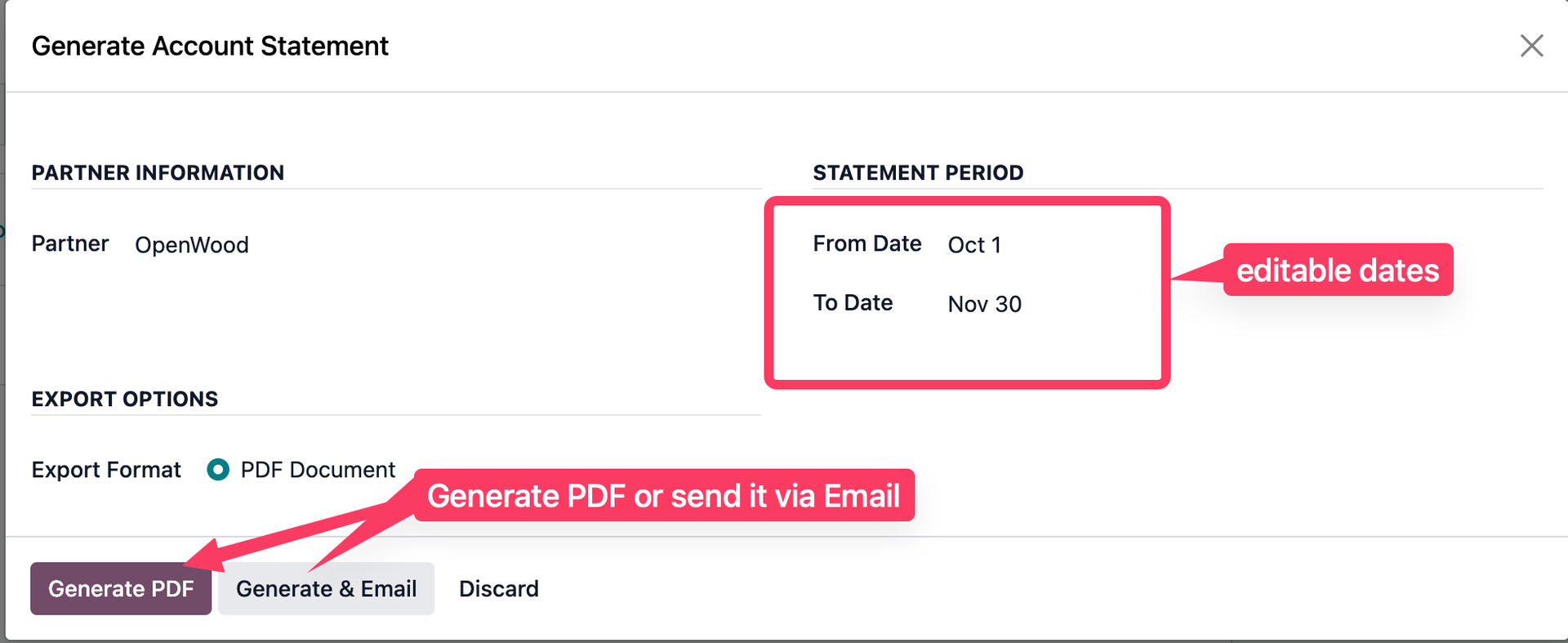
Easy Statement Configuration
The statement wizard provides a simple interface to configure your statement. Select the start and end dates for the statement period, choose the partner (pre-filled when accessed from partner form), and click either "Print" to generate PDF or "Print and Send" to generate PDF and open the email composer.
📊 Professional PDF Statement Report
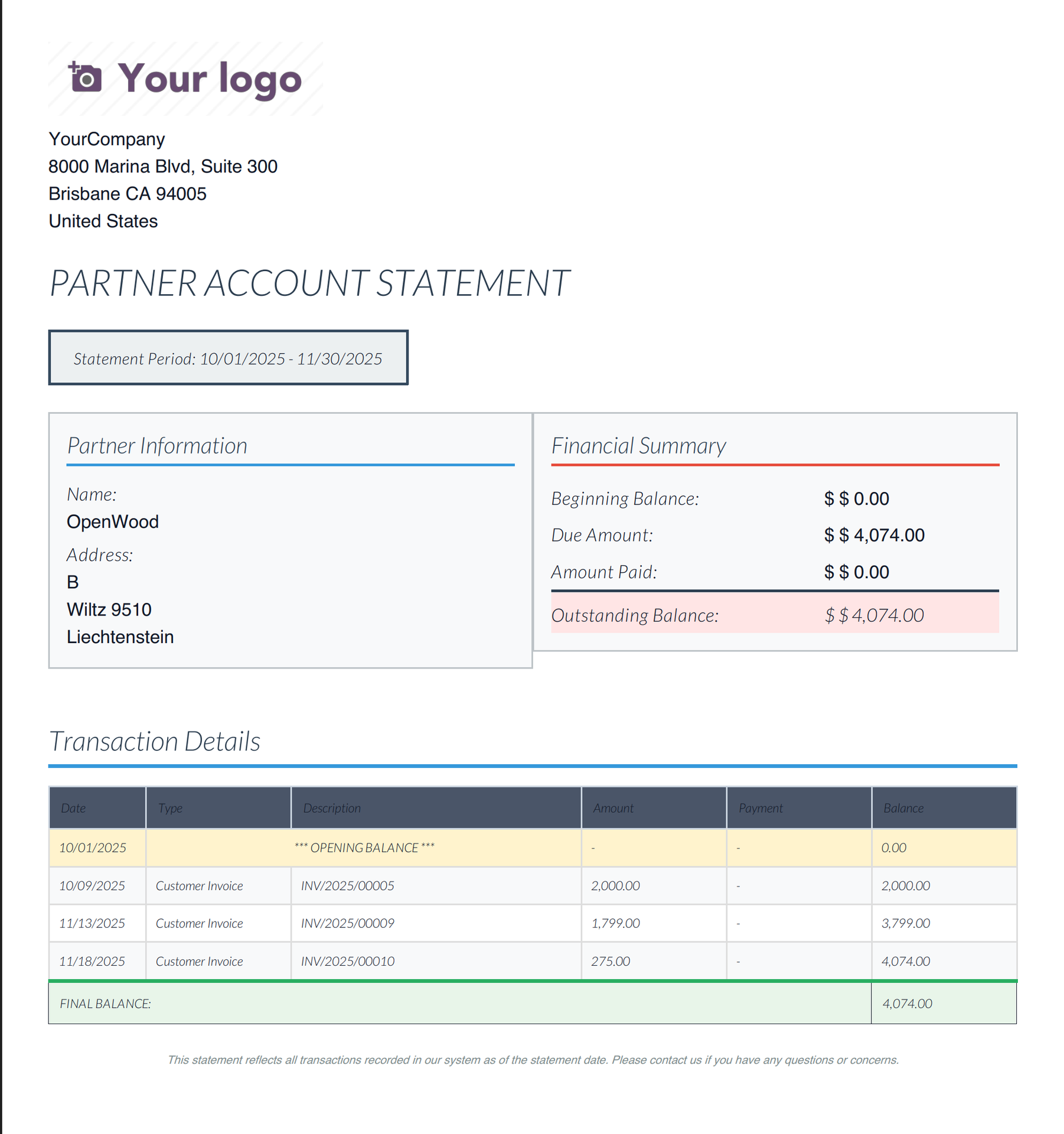
Professional Statement Layout
Beautiful PDF reports with company branding and complete customer information. The statement includes a detailed transaction table showing invoices, credit notes, payments, and running balances, plus a comprehensive financial summary with opening balance, total due amounts, payments received, and outstanding balance.
📧 Email Composer for Sending Statement
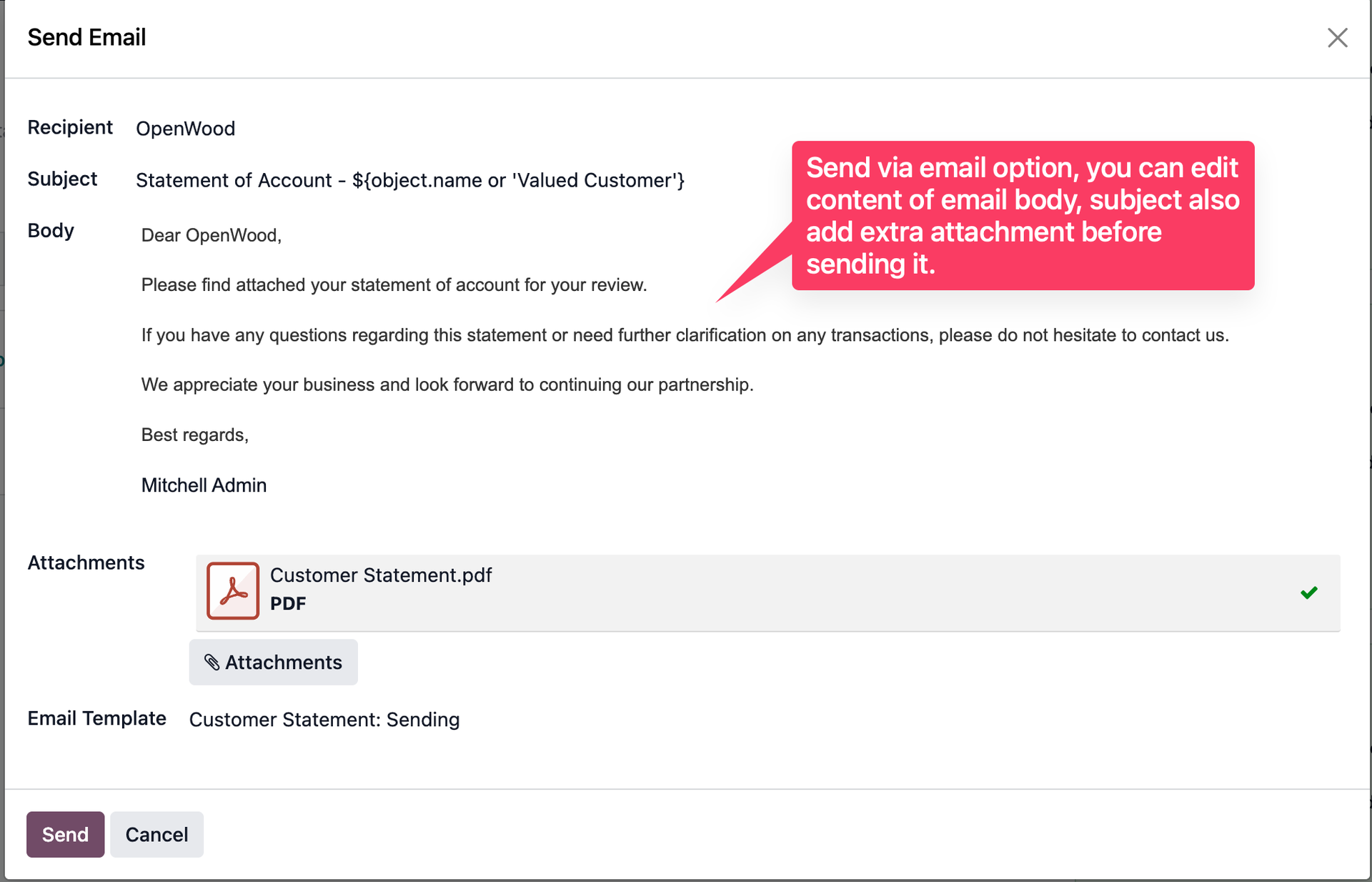
Professional Email Delivery
After generating the statement, the email composer opens automatically with the PDF statement attached. The email template is pre-filled with customer information and professional content. You can customize the subject and body before sending, or use the default template. One click to send professional statements to your customers.
💬 Sent Email Visible in Chatter
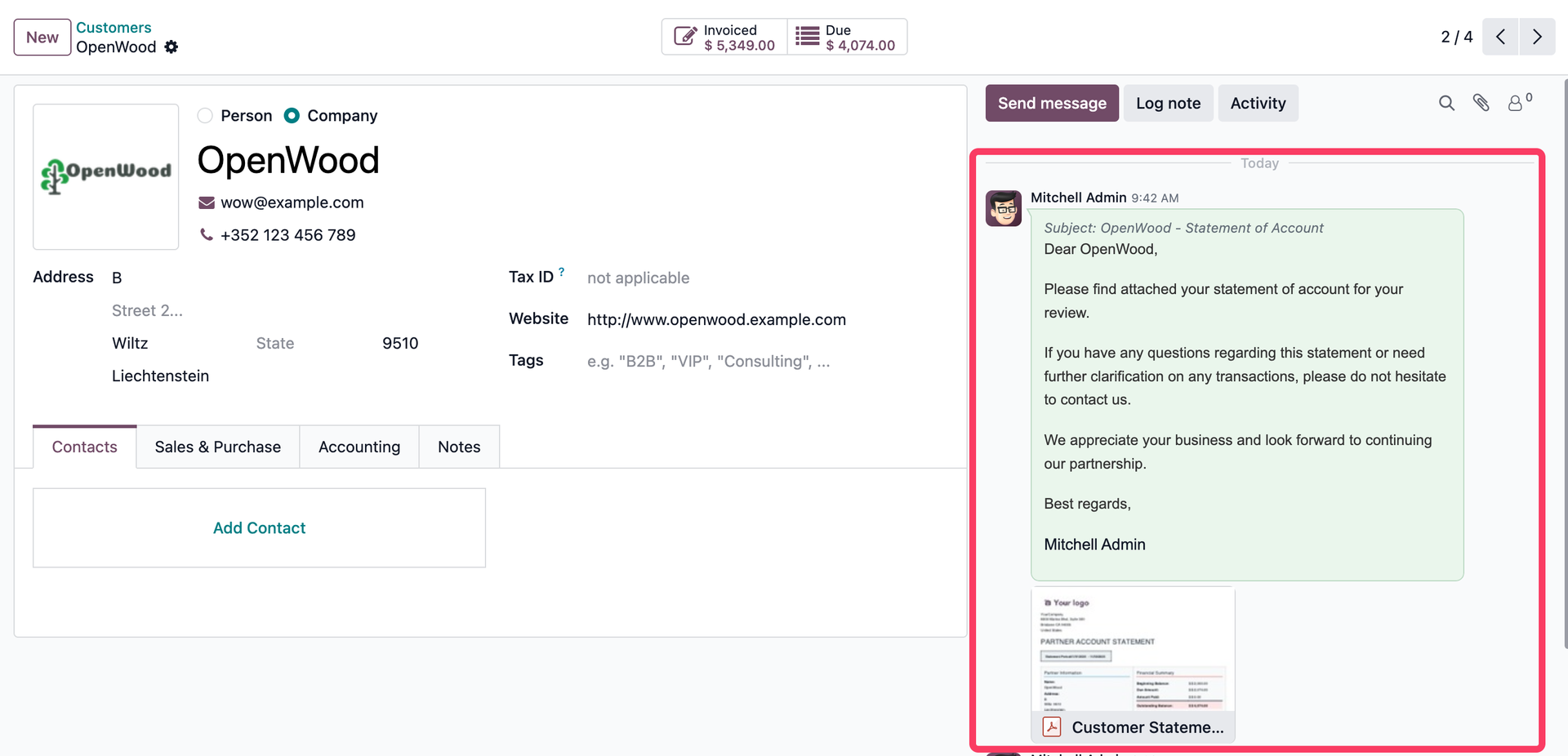
Complete Communication History
When you send a statement via email, it's automatically logged in the partner's chatter. You can see the sent email with the PDF attachment, making it easy to track when statements were sent and maintain a complete communication history with your customers. Perfect for audit trails and customer service.
🚀 Why Choose This App?
Improved Communication
Provide clear, professional statements to customers
Faster Collections
Clear statements help customers understand balances
Time Savings
Automated statement generation and email sending
Professional Appearance
Well-formatted reports with company branding
📝 How It Works
Open Partner
Navigate to customer/partner record in Odoo
Generate Statement
Click "Generate Statement" action and select date range
Print or Send
Print PDF directly or send via email with one click
Customer Receives
Professional statement delivered with clear balance info
💼 Use Cases
Month-End Statements
Send monthly statements to all customers
Payment Reminders
Clear statements for overdue accounts
Customer Inquiries
Quick response to balance questions
Audit Documentation
Professional documentation for records
⚙️ Technical Specifications
📦 Module Details
- ✓ Technical Name: yt_partner_account_statement
- ✓ Version: 1.0.0
- ✓ License: OPL-1
- ✓ Dependencies: account, base, mail
- ✓ Category: Accounting/Reporting
- ✓ Multi-Company Support: Yes
🎨 Key Capabilities
- ✓ Date range selection
- ✓ Opening balance calculation
- ✓ Running balance tracking
- ✓ PDF report generation
- ✓ Email template integration
- ✓ Chatter logging
📥 Installation
Simple installation process - no configuration required!
📋 Installation Steps
- Purchase and download the module from the Odoo Apps Store
- Upload to your Odoo instance's addons directory
- Update the apps list (Apps → Update Apps List)
- Search for "Partner Account Statement" and click Install
- Navigate to any partner record and use "Generate Statement" action
Ready to Streamline Your Customer Communication?
Install Partner Account Statement today and generate professional statements with one click!
💬 Professional Support
Need help or customization?
Email: hello@yugmatech.com
Website: yugmatech.com


